 vs
vs 
Stop paying UserWay for basic accessibility features
UserWay puts more accessibility features behind its paid plans. AccessiYes is a free UserWay alternative that gives visitors more control over text, contrast, reading, navigation, motion, and sound, without requiring an upgrade.
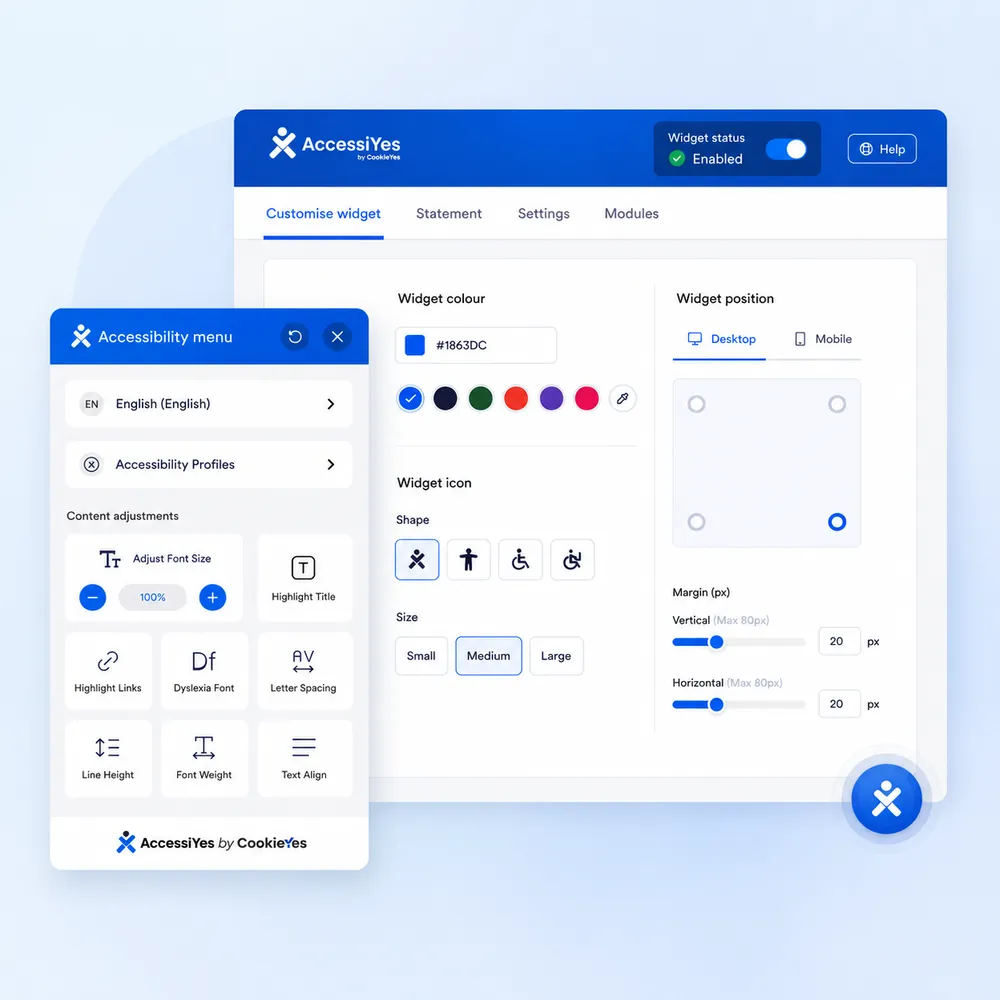
21 visitor controls covering text, contrast, reading, navigation, motion, sound, and more.
Give visitors practical accessibility controls without a subscription or trial expiration.
Use it as a WordPress accessibility widget or on Shopify, Wix, Webflow, Squarespace, and custom sites.
Why AccessiYes over UserWay
UserWay gives you 12 features in its free widget, with a 7-day trial of its paid experience. AccessiYes puts a broader range of 21 visitor control features into its free widget.
| Feature | AccessiYes | UserWay (free) |
|---|---|---|
| Total features | 21 | 12 |
| Text & readability controls | ✓ | ✓ |
| Contrast, color & visual controls | ✓ | Limited |
| Reading & navigation tools | ✓ | Limited |
| Motion & sound controls | ✓ | Limited |
| Accessibility profiles | 4 | ✓ |
| Accessibility statement | ✓ | Only for paid |
| Works across major website platforms | ✓ | ✓ |
What does that mean for your visitors?
With AccessiYes, visitors can personalize more of the way they experience your website without needing you to upgrade to a paid widget plan.
See All 21 FeaturesComparison details reflect UserWay's publicly listed free plan as of this writing. Providers change their features and pricing from time to time, so it's worth checking their site directly for the latest specifics.
Why others said goodbye to UserWay
Don't just take our word for it, here's what UserWay's own users are saying.
"Does not cover ADA compliance"
Despite the legal-support promises made at sign-up.
"[It] misrepresents. It makes website worse. And it will not stop you from being sued."
"Nope. Not giving you all my personal data."
On being asked to create an account and hand over personal info just to test the plugin.
"The plugin persistently displays a large banner in the WordPress admin area, with no option to permanently dismiss it."
See what your visitors can change with AccessiYes
Different visitors need different ways to interact with a website. AccessiYes lets them adjust the experience to suit their needs, without requiring you to make those changes manually.
Make content easier to read
Font size, spacing, alignment, and dyslexia-friendly text.
Change how the page looks
Dark mode, contrast, saturation, and link highlighting.
Navigate with less friction
Reading guide, larger cursor, and pause animations.
Accessibility profiles
Four ready-made profiles for epilepsy, ADHD, seizure safe, and low vision needs.
Accessibility statement
Link your existing statement or generate a new one, right from the widget.
21 accessibility features for free
Live in under two minutes
Activate
One click and you're live, there's no account to create, no dashboard to learn, and nothing to configure first.
Let visitors customize
Visitors choose the text, contrast, reading, and navigation adjustments they need, without any help from you.
Works with WordPress, Shopify, and more
Use it on WordPress or almost any other site. WordPress, Shopify, Webflow, Wix, Squarespace, Joomla, Drupal, Framer, Magento, Next.js, HubSpot, and more. For custom sites, add AccessiYes with a single script tag.
Visitor preferences are stored locally in the browser, with no visitor data sent to our servers.
Loved by website owners, agencies, and teams
Simple to install, easy to use, and built around real visitor needs. See what users have to say.
“AccessYes is one of the best free accessibility widgets I’ve found. It’s fully self-hosted, with no external CDN scripts, no telemetry, and no phone-home behavior during normal operation. The only outbound call is an optional uninstall survey you can skip entirely. Feature-wise, it blows the competition away: dyslexia-friendly fonts, reading mask, contrast modes, text sizing, pause animations, highlight links, language support, and more, all completely free with no upsells locked behind a paywall. Clean code, easy setup, and genuinely privacy-respecting. Highly recommended for any WordPress site.”
“Not only is it an excellent plugin, but the support is incredibly efficient. I had a small problem following WordPress updates, which was resolved quickly and easily. There are real people behind this plugin. I highly recommend it.”
Give your visitors more control
A free UserWay alternative with more included
Give visitors 21 accessibility controls for reading, vision, navigation, motion, sound, and more, in one easy-to-install widget.
Frequently asked questions
UserWay's free tier limits you to 12 basic features and frequently pushes paid upgrades. AccessiYes includes 21 full visitor control features for free, including dark/light contrast modes, reading guides, dyslexia fonts, motion pausing, and 4 pre-configured accessibility profiles with no paywalls or trial expirations.
No accessibility widget can single-handedly guarantee legal or WCAG compliance, and any overlay claiming to do so is misleading. AccessiYes gives your visitors practical UI tools to adjust reading, contrast, and navigation to their personal needs, but underlying site accessibility (like alt text, clean heading structures, and keyboard flow) must still be handled in your design and code.
No. You can download the WordPress plugin or grab the JavaScript embed code and go live instantly: no sign-up, no email required, and no dashboard setup.
Not at all. AccessiYes is built to be lightweight and fast. Furthermore, all visitor settings are stored locally in their browser. We do not track visitors or send user preference data back to our servers.
For non-WordPress platforms, simply paste our single-line JavaScript embed code into your site's <head> tag or header settings. It works seamlessly across Shopify, Webflow, Wix, Squarespace, Framer, Next.js, and custom codebases.
Yes. You can either link directly to your existing site policy or use our built-in generator to create an accessibility statement that visitors can view right inside the widget panel.